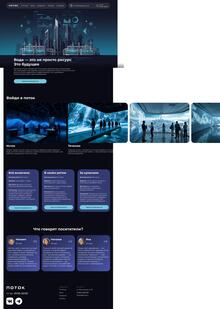
Сайт-лендинг «Поток» разработан в Figma в рамках вступительного портфолио в магистратуру. «Поток» — вымышленная международная выставка инженерных решений, объединяющая гидротехнику, технологии и искусство. Задача проекта — создать целостный образ события, познакомить посетителя с концепцией, пространствами и форматами участия, а также побудить к регистрации. Сайт выполнен в технологичном стиле: тёмно-синяя гамма, неоново-бирюзовые акценты, строгая сетка, продуманная визуальная иерархия. Макет включает все ключевые блоки лендинга, адаптивную сетку и имитацию интерактивных элементов. Проект демонстрирует навыки работы в Figma, владение типографикой, композицией, цветом и понимание структуры цифрового продукта.
Страница сочетает эмоциональную презентацию лагеря и понятный сценарий бронирования: пользователь знакомится с программами, выбирает смену по датам и возрасту, изучает условия, отзывы и оставляет заявку.
start.hsedesign
The HSE Art and Design School spans 4 campuses, offering 9 bachelor's programs and approximately 40 specialized tracks. To apply, you must not only submit your documents on time but also upload your creative project—if required by your chosen program.
applicants’ projects
faculty of pre-university training
lyceum
online school
children's school
We use cookies to improve the operation of the HSE website and to enhance its usability. More detailed information on the use of cookies can be fou...
Show more
Press space bar to start a drag.
When dragging you can use the arrow keys to move the item around and escape to cancel.
Some screen readers may require you to be in focus mode or to use your pass through key
Press space bar to start a drag.
When dragging you can use the arrow keys to move the item around and escape to cancel.
Some screen readers may require you to be in focus mode or to use your pass through key
Press space bar to start a drag.
When dragging you can use the arrow keys to move the item around and escape to cancel.
Some screen readers may require you to be in focus mode or to use your pass through key
Press space bar to start a drag.
When dragging you can use the arrow keys to move the item around and escape to cancel.
Some screen readers may require you to be in focus mode or to use your pass through key
Press space bar to start a drag.
When dragging you can use the arrow keys to move the item around and escape to cancel.
Some screen readers may require you to be in focus mode or to use your pass through key